Tier 1
Fresh Coat
$179one-time
An account that puts your brand on the two screens everyone sees first: the whole app and the sign-in page.
Contact actions bar is not part of Fresh Coat. It starts at the next tier up.
Get Fresh Coat
Now showing Citrus Steam. Your choice is remembered on this device only.
Search every page, guide and blog post. Try no-show, Airbnbor reviews.
Key on file. Recurring. Book the next clean. Ask for the review. Put your most repeated actions on every contact as one-tap buttons and tags, wired to the workflows you already run.
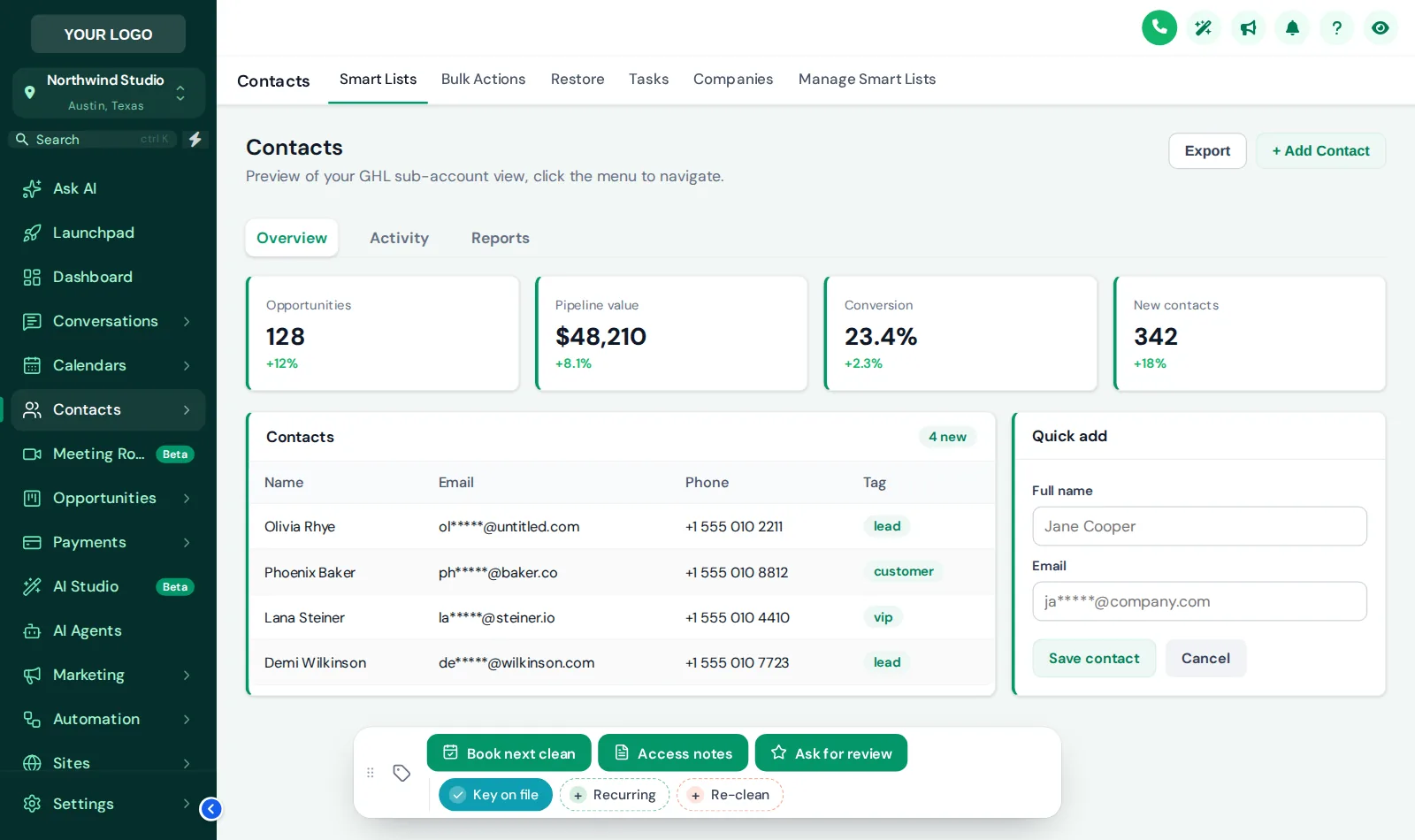
The contact actions bar adds one-tap quick tags, buttons and mini forms to every GoHighLevel contact page. Buttons add or remove tags (which start your workflows) or save fields into the contact, and the bar sits in any of 6 positions. It replaces three-click routines with one tap.
This is the real bar, configured with cleaning-office actions. Change what it shows, how chips are colored and where it sits.
Loading the live preview…
Buttons and quick tags The real contact actions bar on a sample contact. Tap a quick tag to add or remove it, press Access notes to open its form, or drag the bar by its grip. Nothing is saved here; inside GoHighLevel the contact updates straight away.
Examples cleaning offices set up most. Each one only adds a tag or saves a field; your workflows do the rest.
| On the bar | Type | What happens |
|---|---|---|
| Book next clean | Button that adds a tag | Tag "book next clean" starts your rebooking workflow, which texts the client two open slots. |
| Key on file | Quick tag | Marks homes where you hold a key, so dispatch and the crew lead see it on the contact. |
| Recurring | Quick tag | Moves the client into your recurring nurture and stops one-off follow-ups. |
| Re-clean | Quick tag | Flags a complaint, pauses the review request and alerts the manager to schedule a revisit. |
| Access notes | Mini form | Entry method, pets and next clean date saved straight into custom fields. |
| Ask for review | Button that adds a tag | Starts the review request workflow after a job the client was happy with. |
Quick tags toggle on and off with their own colors. Buttons add or remove tags and confirm with a short message. Mini forms open a few fields and write them into custom fields.
Positions available: Bottom centre, Bottom left, Bottom right, Top centre, Top left, Top right.
Write down which tags and updates your office makes most often.
Give each button a tag your existing workflows listen for, or a field to fill.
Labels, icons, chip colors and position, set in the customizer and previewed in your theme.
Tap every button on a test contact and confirm the workflow fires.
An account that puts your brand on the two screens everyone sees first: the whole app and the sign-in page.
Contact actions bar is not part of Fresh Coat. It starts at the next tier up.
Get Fresh CoatEverything in Fresh Coat, plus the tools for the rooms your team works in all day: menus, the dashboard, the job pipeline and one-tap contact actions.
The whole house, top to bottom: every module, the website widgets, and an editor that carries your own brand.
It is a small bar the customizer adds to every contact page, with quick tags and buttons your team taps instead of opening menus. Buttons can add or remove tags, or open a mini form that saves into custom fields. It is in your account from Deep Clean at $429.
Through tags. A button adds a tag such as "book next clean", and the workflow you already have (or that the cleaning snapshot sets up) starts on that tag. Nothing new to learn in the workflow builder.
One-tap chips that add or remove a tag on the contact, with their own color. For a cleaning office: Key on file, Recurring, Re-clean, Pets, Commercial.
Yes. A mini form can collect a few fields (dropdowns, dates, numbers, text) and save them straight into the contact's custom fields, for example entry method, pets in the home and next clean date.
In one of 6 positions (top or bottom; left, center or right), and staff can drag it by its grip if it is in the way.
Yes. The bar sizes down on narrow screens, which is where one-tap tags save the most time for crew leads.
No. In the preview nothing is saved or sent. Inside GoHighLevel the contact updates straight away.
The bar is the same for everyone in a sub-account. Keep it to the five or six actions your whole team repeats, and change them any time in the editor.
No, but it helps. The bar adds tags and fills fields; what happens next is whatever workflow you trigger on those tags. If you run our snapshot, point the buttons at the tags its workflows already listen for.
Every module lives in the same customizer account and goes live through the same one-line install, so these pair naturally. Or go back to the GHL Customizer overview or straight to package pricing.
Contact actions, mega menus, the dashboard and pipeline designers on top of every theme and login: Deep Clean, $429 once.
GoHighLevel and HighLevel are trademarks of HighLevel Inc. Cleaning Services GHL Snapshot is independent and is not affiliated with, endorsed by or sponsored by HighLevel. The customizer platform your account runs on is provided by GHL Customer Care.
Manage how we use cookies. Necessary cookies keep the site working and can't be turned off.
Saved on this device. Press Esc to close.